Technology & Science

  • Google Unveils a Stick That Turns Any Display Into a PC

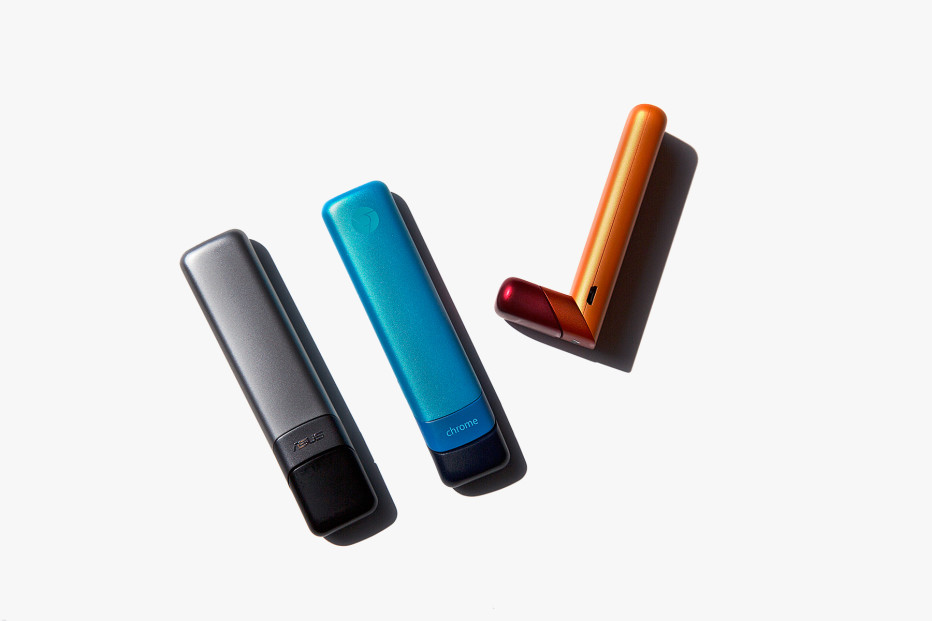
    CAESAR SENGUPTA REACHES into his hip pocket and pulls out a PC. About the size of a cigar, it’s a tiny PC. But it’s a PC. If you plug it into an LCD display or a TV, you can run the sort of software you typically run on a personal computer, from word processors and spreadsheets and email to online video.

    This is the Asus Chromebit, and according to Sengupta, it will reach the market this summer, priced at less than a hundred dollars. Sengupta is the Google vice president who helps oversee the distribution of Chrome OS, the Google operating system that runs the Chromebit. The device is a bit like the Google Chromecast—the digital stick that plugs into your television and streams video from the internet—but it does more. Google pitches it as something that lets you walk up to any LCD display and instantly transform it into viable computer, whether it’s sitting on a desk in a classroom, mounted on the wall in an office conference room, or hanging above the checkout counter in a retail store or fast food joint. “Think about an internet cafe,” Sengupta says during a gathering at Google’s San Francisco offices. “Think about a school lab.”

    The device is part of a new wave of machines that use Chrome OS, an operating system built for the internet age. Based on the Google Chrome web browser, the OS is designed for use with internet-based applications such as Google’s Gmail email service and its Google Docs word processor, reducing our dependence on the bulky local software that traditionally runs on PCs, moving tasks onto a cheaper breed of hardware as a result, and, ostensibly, improving security. Over the past several years, Google has pushed its Chromebook laptops and other Chrome OS machines into schools and, to a lesser extent, government agencies and businesses. Now, with several new devices, including a fresh crop of laptops as well as the Chromebit, the company is renewing this push, continuing to challenge Microsoft for control of the rather lucrative business and educational software markets.

    Today, Google is unveiling several of these laptops, including two $149 models, from manufacturers Haier and Hisense, that will sell through Amazon.com and Walmart. And this summer, Asus will also roll out an ultra-thin Chromebook that converts into a touchscreen tablet (see above). But the Chromebit is the most intriguing play—if only because it shows how small and how inexpensive PC hardware has become in recent years, how much the line has blurred between PCs, TVs, and mobile devices such as phones and tablets.

    This month, Intel will start shipping a similar device called the Intel Compute Stick, which brings Microsoft’s Windows operating system to TVs and other displays. And Dell already offers a device called Wyse Cloud Connect, which works even more like the Chromebit. Certainly, these are niche devices. But they point to a future world where large-screen computers are far more prevalent.

    The trend begins with the Chromecast and similar streaming TV devices from the like of Amazon. With tiny, inexpensive sticks, you can transform older televisions into so-called smart TVs, streaming movies and shows from internet services such as YouTube, Netflix, and Amazon Prime Video. But they’re also mini-PCs. Google product manager Josh Woodward says he and his team offer use the Chromecast to get presentations onto conference room displays. This, he explains, is easier than connecting a laptop or using a projector.


    The Chromebit is really just an extension of this idea. Equipped with much the same hardware as a Chromebook laptop, Sengupta says, it’s more powerful than a Chromecast, which just means it’s better at running more applications. Google believes the devices—equipped with an HDMI port—will provide a way of quickly upgrading existing PCs and perhaps even accelerate the rise of computerized displays inside stores and restaurants. Rajen Sheth, another Google VP who has helped lead the company’s push onto business hardware, says that the price of PC hardware and displays has dropped so low, it may now be cheaper to built digital signage than a traditional paper sign. If you print out a 42-inch paper sign at a place like Kinkos, it’ll cost about two hundred dollars, he says, and that same price will eventually get you a 42-inch LCD and a Chromebit.

    J.P. Gownder, an analyst with research outfit Forrester, who has closely tracked the rise of Google’s Chrome OS business, rightly points out that there other things to consider. In using these types of PC sticks, he explains, you still need a good way of navigating the software it serves up—a keyboard and mouse or some alternative (the Chromebit offers USB and Bluetooth connections). “A device like this has utility, but the problem is interface,” he says. “The utility is not as cut and dried as it many seem.” And because Chrome machines aren’t really built to run local software, they aren’t suited to all situations.

    But Google is working to provide ways of running more local software. This includes versions of online tools such as Google Docs and Gmail that also work offline, classic business software from the companies like SAP, and apps originally built for phones and tablets that run Google’s Android mobile operating system. It’s another nice metaphor for the ever changing world of computer hardware. As time goes on, the distinctions will break down even further—between phone and tablet, tablet and PC, PC and television. 

    Source :

    http://www.wired.com/2015/03/google-unveils-chrome-stick-turns-display-pc/


    Read more
  • How to Have Google Glass Etiquette

    Google Glass is a form of wearable technology. It allows wearers to view information via a hands free, smartphone like format. It can be fun to use and wear but it can be confronting for people who know little about it or who wonder whether you're secretly filming them or taking their image. This article will help you to use good etiquette when wearing Google Glass, helping you to be both polite and respectful towards others in your line of view.

    1. Prepare to be noticed. There are only about 7,000 devices in the US and about 10,000 total in the rest of the world.[citation needed] You will get plenty of attention while wearing Google Glass because it's a novelty and a curiosity at this point in time. The novelty factor and desire to learn more about it makes it even more of a reason to be courteous to those curious about your new technology.
       
    2. If someone asks you about what you're wearing, be gracious. If you have time, explain to them what Google Glass is. No need to let them touch it, if you are not comfortable.
      • Cultivate a response for those who ask what Google Glass is. This will help make the interactions seamless and enjoyable.
       
    3. If you notice someone whispering to a friend about you, just smile. They are more curious than anything. Slightly acknowledging their presence will give everyone peace of mind. 


    Part 2 of 2: Glass Etiquette

    1. Ask for permission before taking photos or video. As with all smart devices, it's always common courtesy to ask before recording images or taking photos. When in public, always ask before you take photos or video. Treat it just like a phone camera.
       
    2. Use Google Glass to help yourself and others. For example, if a friend wants to know the score of the football game, ask Glass and save them the time of looking it up.
       
    3. Respect and acknowledge others while wearing Glass. Your Glass should be treated more as an assistant instead of a new friend. Do not neglect your social circles for sake of your new technology.
       
    4. Limit the times when you have the Glass' screen on. Having the screen on might cause people to think you are recording them. It also drains the battery faster.
       
    5. Know when to leave it at home. As cool and nice as Google Glass is, there are times it's just not appropriate to wear for safety or legal reasons. The following lists just some of the times to leave Glass at home:
        • Movie theaters (cinemas). Recording devices are illegal in movie theaters worldwide. Glass is considered a recording device, as it's not concealed and has a camera.
        • Casinos. Most casinos actually have a "No Glass Policy" when around the gambling tables. They claim it's to prevent cheating and fraud during gambling. It may be okay to wear Glass to casinos, but just keep your distance from the tables.
        • The "bad parts" of town. The majority of people you meet, whether wealthy or poor, will know what Glass is. Google does have insurance on Glass but it doesn't cover theft or loss, so if someone were to take them off your face and run away, you'd be out of luck.
        • Driving. Glass is an electronic device and is considered to be "distractive". For this reason, many states such as California, Nevada, and Washington are giving tickets to those who drive and wear Google Glass, whether it's switched on or not.
          • Some laws are in the process of being passed to remove the driving ban, since with some cars like the Tesla Model S, Glass will assist you with a speedometer, battery life, tire pressure, etc. You'll need to keep yourself updated on progress.
        • Bars. Most people have heard of the Molotov incident in San Francisco.[citation needed] So bars are probably not the place for Glass.
        • Social events when you risk appearing rude. You should not take Glass to large family gatherings or dinners out in public. It can be seen as rude.


      Read more
  • How to Take a Screenshot on a Thinkpad

    The Thinkpad laptop computers have keyboards that will perform more  

    The Thinkpad laptop computers have keyboards that will perform more functions than just type up documents. One button on the Thinkpad keyboard is labeled "Prt Sc," which is short for "Print Screen." When you push this button, the computer creates a carbon copy image of what's on the screen. To save the image, however, you must use an image editor.

    Screenshot of Entire Screen

      • Visit the website or computer page of which you want to take a screenshot.
      • Press the "Print Screen" button. It may be labeled "Prt Sc," "PRTSC" or "PRTSCN."
      • Click the Windows orb. Type "Paint" in the white search bar and click on the "Paint" result under "Programs" to open Paint.
      • Click on the button labeled "Paste" in the top left corner of the screen. Click the blue "Paint" button in the top left corner of the screen, and click "Save." Find a location on the computer to save the screenshot and click "Save."

    Screenshot of Certain Screen

    • Open the screen that you want to take a screenshot of.
    • Hold "Alt" and push the "Print Screen" button.
    • Click the Windows orb. Type "Paint" into the search bar and click "Paint" under "Programs."
    • Click the "Paste" button to paste the screenshot. Click the blue "Paint" button and click "Save." Select a folder in the following menu that appears to store the image and click "Save."

    Source:

    Read more
  • Human Brain Analysis - Man vs. Woman......A MUST READ!

    1. MULTI-TASKING
    Women - Multiple process
    Womens brains designed to concentrate multiple task at a time.
    Women can Watch a TV and Talk over phone and cook.
    Men - Single Process
    Mens brains designed to concentrate only one work at a time. Men can not watch TV and talk over the phone at the same time. they stop the TV while Talking. They can either watch TV or talk over the phone or cook.
    2. LANGUAGE
    Women can easily learn many languages. But can not find solutions to problems. Men can not easily learn languages, they can easily solve problems. That's why in average a 3 years old girl has three times higher vocabulary than a 3 years old boy.
    3. ANALYTICAL SKILLS
    Mens brains has a lot of space for handling the analytical process. They can analyze and find the solution for a process and design a map of a building easily. But If a complex map is viewed by women, they can not understand it. Women can not understand the details of a map easily, For them it is just a dump of lines on a paper.
    4. CAR DRIVING.
    While driving a car, mans analytical spaces are used in his brain. He can drive a car fastly. If he sees an object at long distance, immediately his brain classifies the object (bus or van or car) direction and speed of the object and he drives accordingly. Where woman take a long time to recognize the object direction/ speed. Mans single process mind stops the audio in the car (if any), then concentrates only on driving.
    5. LYING
    When men lie to women face to face, they get caught easily. Womans super natural brain observes facial expression 70%, body language 20% and words coming from the mouth 10%. Mens brain does not have this. Women easily lie to men face to face.
    So guys, do not lie face to face.

    6. PROBLEMS SOLVING
    If a man have a lot of problems, his brain clearly classifies the problems and puts them in individual rooms in the brain and then finds the solution one by one. You can see many guys looking at the sky for a long time. If a woman has a lot of problems, her brain can not classify the problems. she wants some one to hear that. After telling everything to a person she goes happily to bed. She does not worry about the problems being solved or not.
    7. WHAT THEY WANT
    Men want status, success, solutions, big process, etc... But Women want relationship, friends, family, etc...
    8. UNHAPPINESS
    If women are unhappy with their relations, they can not concentrate on their work. If men are unhappy with their work, they can not concentrate on the relations.
    9. SPEECH
    Women use indirect language in speech. But Men use direct language.
    10. HANDLING EMOTION
    Women talk a lot without thinking. Men act a lot without thinking.

    Read More
    Read more

Latest Articles

Most Popular