Technology & Science

  • Google’s New “My Activity” Page Reveals Everything You Do Online

    As we already know giant companies like Google track their user’s online data. Recently google introduced a new site that lets you see the recorded data for yourself. So, How to know exactly how much a company like Google knows about us?

    Google’s New “My Activity” Page Reveals Everything You Do Online

    Google’s new My activity page actually lists everything that is collected while you browse online using Google or its services. Google’s new My Activity page also shows all the search performed using various devices since it is linked to your Google account.

    Google said in a post “Your searches and browsing history are saved to your Google Account if Web & App Activity is turned on. When Web & App Activity is on, you may get better search results and recommendations across Google services.”

    Google had also shared what type of information it saves which includes searches and other things you do on Google products and services, like search and Maps. It even saves your connection information that includes location, language and whether you use a browser or an app. It also keeps information regarding ads that you respond to by clicking the ad itself or purchasing something on the advertiser’s site. It also records your IP address.

    Apart from all this Google also keep records of all your chrome browsing history, Websites and apps you use and the data they share with Google. Your activity on websites and in apps that use any Google service. Google said “When Web & App Activity is on and you check the box next to “Include Chrome browsing history and activity from websites and apps that use Google services,”

    Users can now control what’s being saved by google, and can manage them according to their wishes. They can delete their past searches and browsing activity etc. Google said: “You’re in control of what’s saved, and you can delete your past searches and browsing activity or turn off Web & App Activity at any time.”

    My Activity is a really a great tool for anyone with a Google account. However, the important point to be noted here is when you use all these free apps and services of Google, you are actually giving up your personal data to do it.

    SOURCE:

    http://techviral.com/googles-new-activity-page-reveals-everything-online/

     

    Read more
  • Finding Free Wi-Fi

    Multiple websites and smartphone apps can help you identify free Wi-Fi in your area, and the list will surprise you — it also keeps getting longer. You need to perform some advance research if your goal is to hang out wherever you can get some free downloads.

    Use one of the many websites or smartphone apps that provide free Wi-Fi listings:

    Websites:

    Smartphone apps:

    SOURCE:

    - http://www.ehow.com/how_4876806_wifi-access-anywhere.html

    Read more
  • Improve Your Home’s Wi-Fi Signal in Five Minutes

    Wi-Fi is just radio waves, and many things can cause interference. But a strong Wi-Fi signal can give you faster performance and better coverage distance, so it’s important to properly position and configure your router for optimal signal strength. I’ll show you how; it just takes a few minutes.

    Point the Antenna Up

    Routers generally have physical antennas that are adjustable. The antenna often comes pointed horizontally to fit the router inside its box. For maximum signal strength, position your router’s antenna vertically, pointing straight up. If you have two antennas, you won’t get better performance by pointing them in different directions.

    Position Your Router Properly

    Consider where you put your router. If you have a large home or office, place the router close to the center to maximize coverage. If you position the router at one end of the building, you may have poor (or no) signal at the other end.But keep in mind that if you already have your router positioned at one end of your home and the signal strength is just fine on the other side, you don’t need to move it.

    For maximum coverage, the router should also be high up. Placing it on the floor is the worst location possible – place it on a high shelf, if possible.

    Don’t place the router on or near large metal objects, such as metal shelves or filing cabinets. These can block the signal. Metal or stone walls can also block Wi-Fi, while wood and plaster walls won’t cause any problems.

    You might be able to root out other sources of interference. For example: microwave ovens, 2.4 GHz cordless phones, and 2.4 GHz baby monitors all have the potential to interfere with a Wi-Fi signal. I’ve personally experienced a Wi-Fi signal to my laptop dying every time a microwave oven was turned on. The microwave oven was in direct line-of-sight between my  laptop and the router. The solution? Move any one of them so that the microwave isn’t in between. If you get interference from a cordless phone, you might want to purchase newer 5.8 GHz cordless phones; these  workon a frequency band other than Wi-Fi and don’t cause any interfere.

    Choose the Best Wi-Fi Channel

    If you’re in an area with many different Wi-Fi networks — such as an apartment complex or even just a house close to other homes — your neighbors’ Wi-Fi networks are probably interfering with yours.

    To minimize this, move your router further away from the other Wi-Fi access points, if you can. For example, if you’re in an apartment and have a router in the corner of your room, your neighbor’s router might be right on the other side of the wall.

    But the best thing you can do is switch to a different Wi-Fi channel. You access this option on your router’s settings page — check your router’s instruction manual for instructions on how to do that. (If you don’t have the instruction manual, you can almost certainly find the instructions online.) Locate the Wi-Fi channel option in the router’s web interface and change it to a different channel with less interference.

    It might take a little experimentation to find the best one, but you can get help choosing a Wi-Fi channel using the Wi-Fi Analyzer app for Android phones and tablets, which will monitor the Wi-Fi networks near you and recommend the least-cluttered Wi-Fi channel for your network. Unfortunately, similar apps aren’t available for iPhone or iPad due to the limitations Apple places on app developers.

    That’s it — all you really have to do is position your router well and choose the ideal Wi-Fi channel to optimize your network. Of course, buying a new router that supports modern, improved Wi-Fi standards may also offer you a signal strength and speed boost.


    Read more
  • The First Laptop with Generic Amharic Keyboard

    Lately we Ethiopians are feeling like we have gone backwards in many aspects. We face the worst drought in about 30 yrs. We have got issues with our grand dam project, there is no enough transportation, water, and energy source. The list goes on.

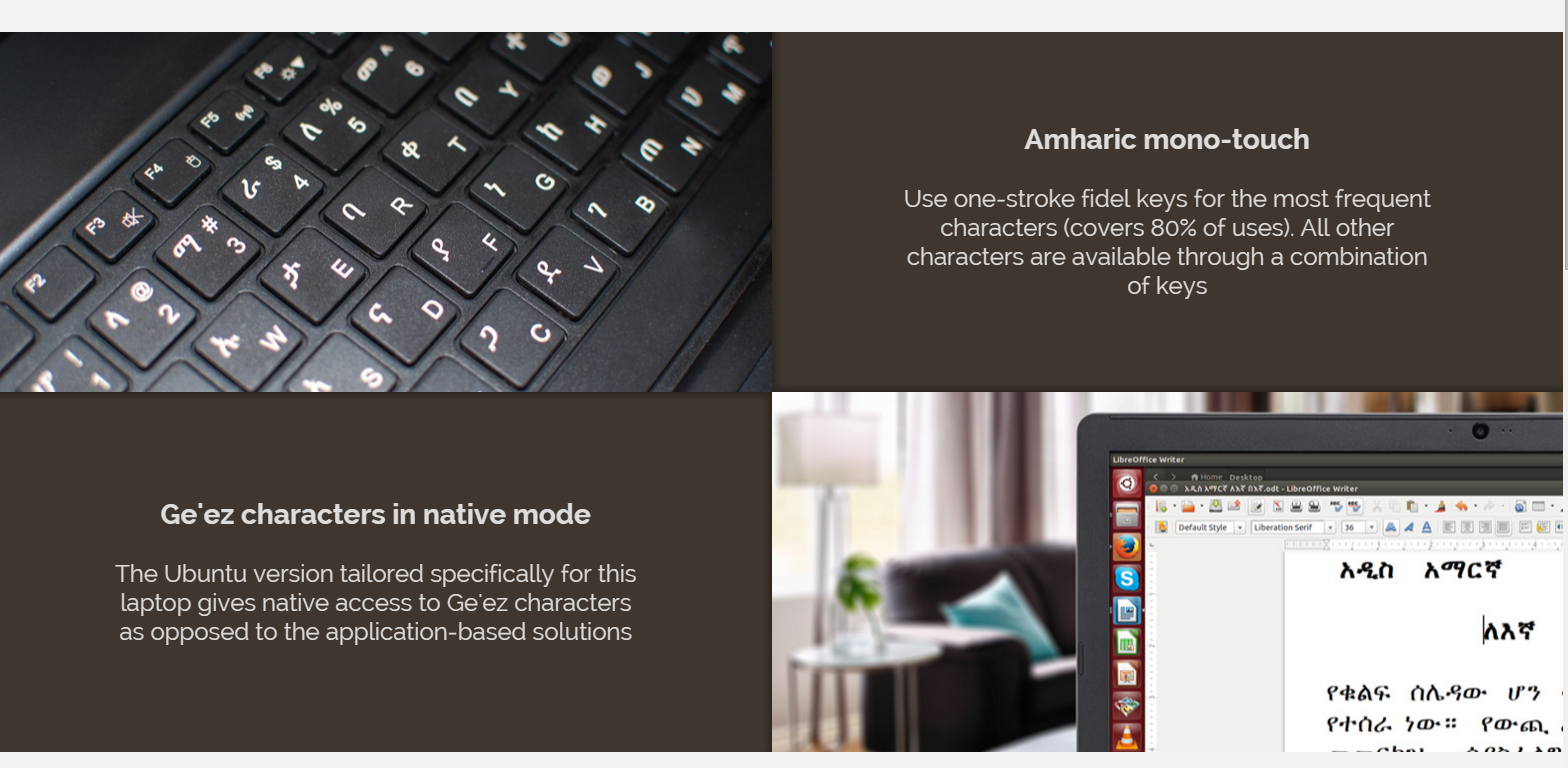
    But here is our Christmas gift, a light in the darkness by a fellow Ethiopian, Genet Ayele. She has given us a laptop with the first Amharic Keyboard. This is a great news for Ethiopia, a country that has more that 80 dialects, one of which is Amharic. Amharic uses its own phonetics and until now we have been using Software with English keyboard in order to write Amharic text.

    That is about to change with Ethiopass. Ethiopass is a laptop made in collaboration with FUJITSU Notebook. It comes with Intel® CoreTM i5-5200U processor and AMD RadeonTM R7 M260 graphics card with 2GB dedicated memory, in addition to the Amharic keyboard. From what we have gathered, the Price is 999 euros and offering free shipment until the end of January to all EU countries and Switzerland.

    We like it and Marry Christmas to you too 


    Visit  Her Website: http://ethiopass.visascol.com/


    Read more
  • 5G Mobile Wireless Technology

    - preliminary details and information about the wireless technology being developed for 5th generation or 5G mobile wireless or cellular telecommunications systems


    With the 4G telecommunications systems now starting to be deployed, eyes are looking towards the development of 5th generation or 5G technology and services.

    Although the deployment of any wireless or cellular system takes many years, development of the 5G technology systems is being investigated. The new 5G technologies will need to be chosen developed and perfected to enable timely and reliable deployment.

    The new 5th generation, 5G technology for cellular systems will probably start to come to fruition around 2020 with deployment following on afterwards.

    5G mobile systems status

    The current status of the 5G technology for cellular systems is very much in the early development stages. Very many companies are looking into the technologies that could be used to become part of the system. In addition to this a number of universities have set up 5G research units focussed on developing the technologies for 5G

    In addition to this the standards bodies, particularly 3GPP are aware of the development but are not actively planning the 5G systems yet.

    Many of the technologies to be used for 5G will start to appear in the systems used for 4G and then as the new 5G cellular system starts to formulate in a more concrete manner, they will be incorporated into the new 5G cellular system.

    The major issue with 5G technology is that there is such an enormously wide variation in the requirements: superfast downloads to small data requirements for IoT than any one system will not be able to meet these needs. Accordingly a layer approach is likely to be adopted. As one commentator stated: 5G is not just a mobile technology. It is ubiquitous access to high & low data rate services.

    5G cellular systems overview

    As the different generations of cellular telecommunications have evolved, each one has brought its own improvements. The same will be true of 5G technology.

    • First generation, 1G:   These phones were analogue and were the first mobile or cellular phones to be used. Although revolutionary in their time they offered very low levels of spectrum efficiency and security.
    • Second generation, 2G:   These were based around digital technology and offered much better spectrum efficiency, security and new features such as text messages and low data rate communications.
    • Third generation, 3G:   The aim of this technology was to provide high speed data. The original technology was enhanced to allow data up to 14 Mbps and more.
    • Fourth generation, 4G:   This was an all-IP based technology capable of providing data rates up to 1 Gbps.

    Any new 5th generation, 5G cellular technology needs to provide significant gains over previous systems to provide an adequate business case for mobile operators to invest in any new system.

    Facilities that might be seen with 5G technology include far better levels of connectivity and coverage. The term World Wide Wireless Web, or WWWW is being coined for this.

    For 5G technology to be able to achieve this, new methods of connecting will be required as one of the main drawbacks with previous generations is lack of coverage, dropped calls and low performance at cell edges. 5G technology will need to address this.

    5G specifications

    Although the standards bodies have not yet defined the parameters needed to meet a 5G performance level yet, other organisations have set their own aims, that may eventually influence the final specifications.

    Typical parameters for a 5G standard may include:


    SUGGESTED 5G WIRELESS PERFORMANCE
    PARAMETERSUGGESTED PERFORMANCE
    Network capacity 10 000 times current network
    Peak data rate 10 Gbps
    Cell edge data rate 100 Mbps
    Latency < 1 ms


    Source : http://www.radio-electronics.com/info/cellulartelecomms/5g-mobile-cellular/technology-basics.php

    Read more

Latest Articles

Most Popular