Technology & Science

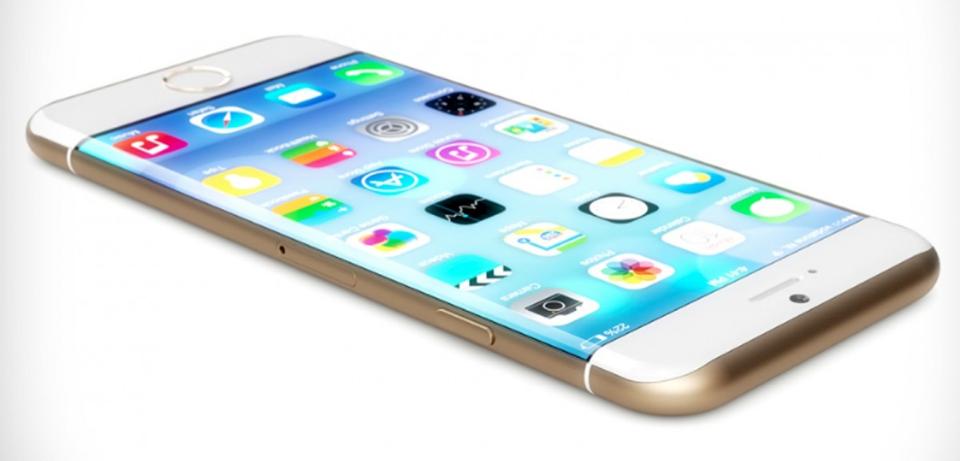
  • Shares in UK chip designer Imagination Technologies have plunged more than 60% after Apple said it would end a deal to use its products | Technology

    The US company uses the UK firm's chip technology in its iPhones, iPads, and iPods under a licensing agreement.

    Apple's royalty payments account for about half Imagination's revenues.

    Shares fell 165p to 103p, valuing the company at about £250m - down from about £765m before the announcement was made on Monday morning.

    Imagination said Apple, its largest customer, would stop using its products in "15 months to two years".

    Apple is developing its own technology, but Imagination said this would be difficult without infringing patents.

    Apple has told Imagination that it is "working on a separate, independent graphics design in order to control its products and will be reducing its future reliance on Imagination's technology".

    Imagination, like the UK's ARM Holdings, is at the forefront of computer chip technology globally. ARM was sold last year to Japan's Softbank, a deal criticised as selling out of the UK's winners.

    The Financial Times reported last year that Apple, which owns 8% of the UK company, had held talks about buying Imagination.

    SOURCE:

    BBC :- http://www.bbc.com/news/business-39476898

    Read more
  • Intel’s “Kaby Lake” Processors Are So Powerful, You Won’t Need Graphics Card | Technology

    Intel has revealed its 7th Generation Core line, which is code-named “Kaby Lake” will have powerful new graphics capabilities and can handle 4K graphics without any glitch.

    Intel’s “Kaby Lake” Processors Are So Powerful, You Won’t Need Graphics Card

    What if someone tells you that the upcoming 7th gen Core processors would be able to handle 4K graphics without any glitch? It sounds impossible, but it is actually true. If we have a look at our Intel’s integrated graphics processor, then they have failed to deliver performances like Nvidia Titan X or Radeon Pro SSD.

    A graphics processing unit (GPU), also occasionally called visual processing unit (VPU), is a specialized electronic circuit designed to rapidly manipulate and alter memory to accelerate the creation of images in a frame buffer intended for output to a display. GPUs are used in embedded systems, mobile phones, personal computers, workstations and game consoles.

    Kaby Lake is Intel’s codename for the upcoming 14-nanometer successor to the Skylake microarchitecture. It will feature a new graphics architecture to improve performance in 3D graphics and 4K video playback.

    ntel CEO Brian Krzanich revealed the Kaby Lake processors during its IDF 2016 Developer conference and shows the capabilities of Intel’s next-gen Kaby Lake chips on a Dell XPS. The best part is the 7th gen Core processor swiftly handled the 4K GoPro videos and showed us the gameplay of the Game Overwatch without any need for a GPU.

    Kaby Lake will add native USB 3.1 Generation 2 Ports, whereas Skylake motherboards require a third-party add-on chip in order to provide USB 3.1 (10 Gbit/s) ports. Kaby Lake will add native HDCP 2.2 support, along with full fixed function HEVC Main10/10-bit and VP9 10-bit hardware video decoding.

    Before Kaby Lake, Cannon Lake was scheduled to launch this year. However, Intel seems to change its mind and went on with Kaby Lake. The 10nm-based Cannon Lake was scheduled to launch at 2017.

    Kaby Lake devices should start arriving this fall, so stay tuned for more on when you can get in on Intel’s next generation of powerful processors.

    SOURCE: Techviral.com/

    - http://techviral.com/kaby-lake-processors-wont-need-graphics-card/


    Read more
  • How to Make WhatsApp and FB Messenger Online All the time In Android

    Make your FB and Whatsapp apps always active in your android mobile with the help of two possible ways that we have discussed right here with which you will always appear online on these giant social networks.

    Facebook and Whatsapp are the best ever social networking media that has ever been created. There are also the mobile apps available for these networks. Almost every social network user on this network would be knowing that these apps has a feature that helps to tell your friends that whether you are available to chat or not. This message of whether you are active for the chat or not is conveyed by the mark of Online or Offline that you might be familiar with. If you have a tricky mind and want yourself to be shown as active or online always on these networks so that your friends may get fooled, then you will surely like to do that in real but you might be thinking about how you can do that. Here in this article you will come to know about the trick to make yourself always online on WhatsApp and FB Messenger. Just go through the following instructions to know how you can do that.


    How to Make WhatsApp and FB Messenger Online All time In Android

    #1 Using Screen Timeout

    1.  First of all check that your mobile apps for WhatsApp or FB are up-to-date i.e you should have installed the latest version for these apps. This step is really important otherwise you won’t be able to make your accounts always online.

    2. After that you need to enable by heading to Settings -> About Phone -> Build Number(Tap on build number 7-10 times and your developer options will get activated), and then in developer option click on the option Stay awake.
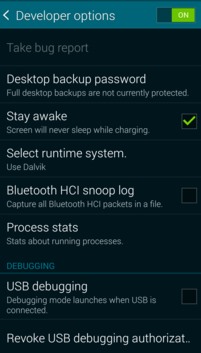


    NOTE: This will never let the screen of your device to shut off and it will always remain lit unless you will switch it off through lock screen button on your device.

    3. And that’s all, you are nearly done. Now you just have to switch your device network ON and then open your account on FB or WhatsApp. The time till the screen on your device remains active, you shall never go Offline. So keep your screen active and you will remain Online and once the screen is locked you will be shown Offline.


    #2 Using Third Party App

    Here you can use a cool third party app that will allow you to make your whatsapp and Facebook online. This app keeps your screen on when your device is running your GPS application, favorite remote control, playing a movie or slideshow. Perfect to keep your screen on without dimming for application development. Your screen will never go back to sleep until you want it to. So try this app.


    The main thing behind this trick is that you have to make the screen of your device active and don’t let it go to sleep. The time till your screen is active, you will remain active on FB and WhatsApp. You can also do this up by using some apps that help you to let the screen of your device remain active. If you are an Android device user, then you can also use Stay Live app for your device that will make the screen of your device active for all the time.

    Here in this article you have now learnt the trick of how you can make the WhatsApp and FB Messenger online for all the time. You people might be thinking that it would be not the greatest trick because you have to keep the screen of your device lit whole of the time, but guys this is the only way that can let you do that and further if we shall found any other trick for the same then we will provide you with that also. Till the time you just go and try this one and enjoy being Online.


    Source:

    TechViral:

    http://techviral.com/make-whatsapp-fb-messenger-online-android/

    Read more
  • How to Watch 3D Movies on PC Using VLC Media Player

    Yes, it’s possible. So have you noted another feature of VLC player!
    But the only problem is that it supports Red and Cyan 3D viewing option only. So just get a 3D SBS (Side-By-Side) movie and watch it using your VLC media player.

    Like us many of you must be crazy about watching movies in your smart device and what about 3D movies that you can only watch in either theater or in your 3D LED TV and other devices that supports 3D effect. But you can watch these movies in your computer too. Yes it is true we have a way for VLC media player by which you will play these movie in VLC media player and watch them with your SBS glasses. So have a look on this method that i have completely discussed below.

    How to Watch 3D Movies on PC Using VLC Media Player

    Many of you must try watching 3D movies in your computer but failed to watch them in 3D effect as they looks ugly but with a simple change in settings of VLC media player you can actually enjoy the 3D effect in your PC itself. So read out the complete steps and apply them in your VLC media player and enjoy your favorite movies in 3D effects.

    Steps To Watch 3D Movies on PC Using VLC Media Player:

    1. First of open and play and of your 3D movie in your PC with VLC media player(Make sure that the movie you played must be SBS (Side-By-Side) 3D movie).
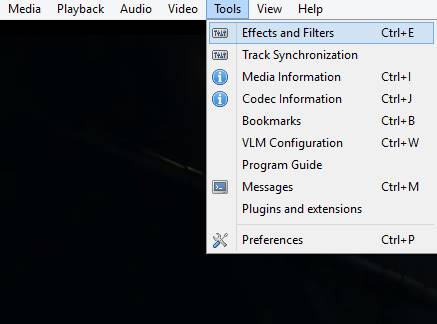
    2. Now when the movie start on the upper bar of VLC click on tools and then select Effect & Filters.


    3.Now a dialog box will appear like shown below, there click on Video Effects tab.


     4.Now here select Advance tab and you will see option like below.


    5.Now here put a check mark on Anaglyph 3D option( This effect enables the 3D effects of your VLC media player).


    6.Thats it your are done, now put on your Red/Cyan glasses and enjoy your 3D movie in your favorite media player that is VLC media player.

    So above we discussed about Watch 3D Movies on PC Using VLC Media Player. With this method you don’t need to play each movie in your 3D enabled device as laptop is more portable than any other device, so just implement these settings in your VLC media player and enjoy these 3D movies in your PC itself. Hope you like our work, do share our tricks with others too. Leave a comment below if you have any related queries with the method discussed above.

    Read more
  • Ever Wondered What This Tiny Cylindrical Thing At The End Of Your Charger Is For?

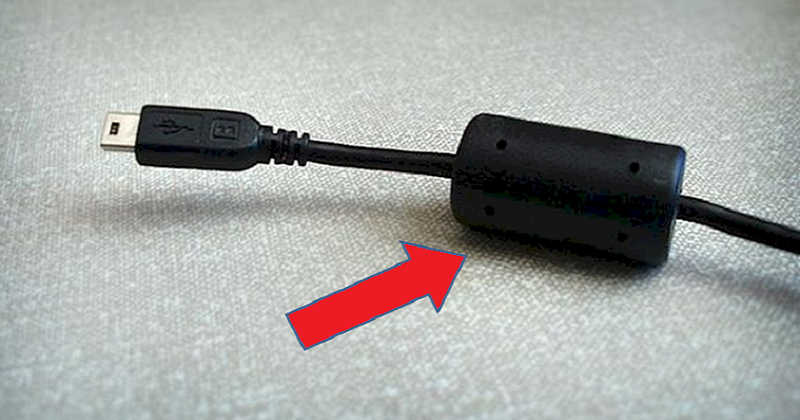
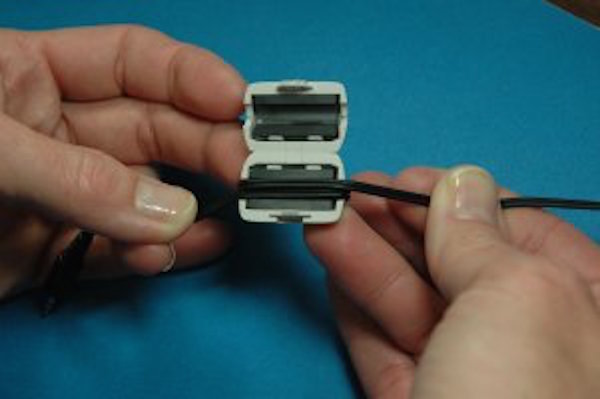
    Have you ever noticed the small cylindrical module near the end of your charger? If you haven’t noticed yet, now just take a look at the end of your charger or device plug, it must have some sort of plastic cylinder near to the end of the cable, right?

    What Is That Little Cylinder on the Cable of Your Charger?


    Well, it might look like a useless addition, but without this little thing, your lappy wouldn’t be able to function properly. Here’s why.

    That little cylinder is called a Ferrite Bead.

    The cylindrical device is known as a ferrite bead, which is nothing but an inductor (passive electric component) that suppresses high-frequency noise in electronic circuits.

    The ferrite bead isolates your laptop from electromagnetic noise, either from the waves that are picked up by the wire or from the existing noise in the AC-DC converter or the AC line.


    While you find this cylindrical module common for laptop cords or other electronic devices such as printers, you won’t find this extra piece on other chargers like that of a cell phone. This is because unlike cell phones or other devices that need to be charged (i.e., your iPad or tablet), laptops tend to have many moving parts working at once. This can create a lot of chaos and disorder if the parts aren’t working together, even capable of producing radio frequencies. The case around the laptop charger dulls those vibrations and stops them from causing any interference.


    Ferrite beads are made of a hollow disc, an iron oxide material with magnetic properties. It helps to prevent the wire behave on over floating current like aerials. As a result, all this metal wire can potentially serve as an antenna by absorbing or emitting any radiation while passing current around it. Without this ferrite bead, the radiation emitted by the wires could cause interference with other electronic objects around them which act as receptors of this radiation, causing, for example, noise in speakers.

    This is why you find those small cylindrical modules at the end of the cables.


    Read more

Latest Articles

Most Popular